Learn
Does proximity mean low latency?
Why did our Singapore server take 465 ms to reach GitHub, when GitHub's server is in the same city?
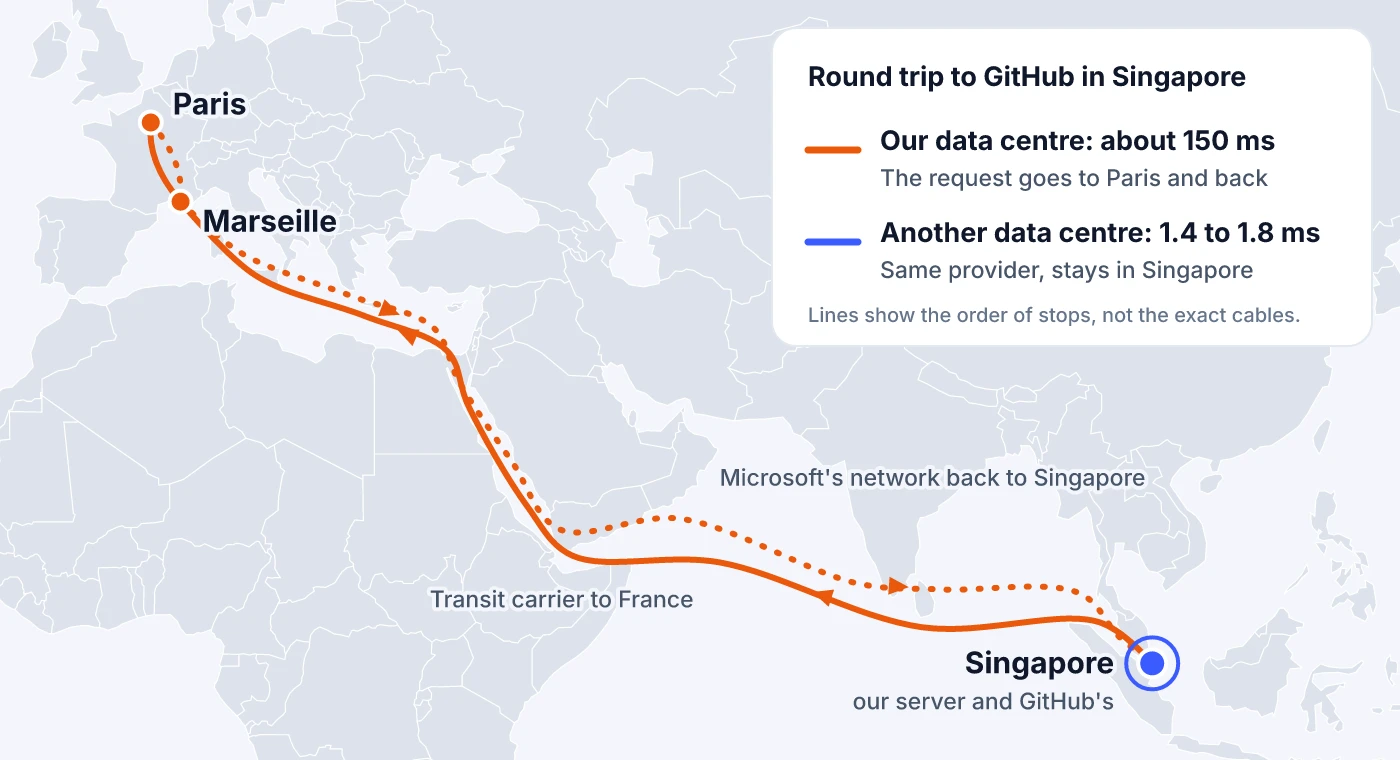
It turns out our server was going all the way to Paris to reach a GitHub server in Singapore. The investigation below shows how we found out, one step at a time.
The number that didn't fit
Every day we call the GitHub REST API's rate-limit endpoint from six cities. Between 27 September and 10 October 2026 the typical time was 13 ms from Tokyo, 26 ms from Mumbai, 29 ms from Amsterdam and 47 ms from Montreal. From Singapore it was 465 ms.
It wasn't a bad day. Singapore's daily medians stayed between 459 and 501 ms, and the result had looked like that since our first collection on 27 August. A steady number is easy to believe. Our GitHub API page explained it with distance, and we nearly wrote a headline saying GitHub's API was 36 times slower in Singapore than in Tokyo.
That headline would have been wrong. GitHub has servers in Singapore, and so do we. The slow part was the road between them.
Step 1: split the time
Each of our requests opens a new connection and times every phase on its own. That breakdown is the first thing to read when one city looks wrong, because each phase has a known cost in round trips.
| Phase | Singapore | Tokyo |
|---|---|---|
| Reaching the server (TCP connect) | 152 ms | 3 ms |
| Setting up a secure connection (TLS) | 154 ms | 4 ms |
| Waiting for the server to respond | 156 ms | 6 ms |
| Together | 463 ms | 13 ms |
A TCP connection takes one round trip. Here the TLS handshake took one more, which is what TLS 1.3 needs. Sending the request and getting the first byte back is a third. Three phases of almost exactly the same length mean each one was a single round trip of about 150 ms, and GitHub answered within a few milliseconds of the request arriving. The server wasn't slow. Something between us and it was.
The same thing makes bigger responses worse. The github.com homepage is about 575 KB of HTML, and a new connection can't send it all at once: TCP sends data in growing batches and waits for acknowledgements in between. In the same run Singapore spent 152 ms connecting, 153 ms on the secure connection, 157 ms waiting and 749 ms receiving the page. Its typical time for the homepage was 1,215 ms, against 24 ms in Tokyo.
Light in fibre covers about 100 km of distance per millisecond of round trip. A 150 ms round trip is what you'd expect from a server about 15,000 km away, farther than Amsterdam is from Singapore. So either GitHub's server wasn't in Singapore, or our packets weren't taking the short way.
Step 2: find out where the server is
From Singapore, api.github.com resolved to 20.205.243.168, an address in Microsoft's network (AS8075). An IP address doesn't tell you where the machine is. Geolocation databases guess, and they're often wrong for cloud ranges. Measuring is more reliable: ping the address from places you know and see which distances fit.
| From | Straight-line distance to Singapore | Best possible round trip | Measured |
|---|---|---|---|
| Mumbai | About 3,900 km | About 39 ms | 60 ms |
| Tokyo | About 5,300 km | About 53 ms | 67 ms |
| Singapore | Same city | Under 1 ms | 150 ms |
The best possible round trip uses the 1 ms per 100 km rule. Real cables don't run in straight lines, so measured times always sit above it.
Mumbai and Tokyo both land a little above the floor for a server in Singapore. If the server were somewhere else, at least one of them would be far off. Our own Singapore machine, a few kilometres away, was the slowest of the three. We also pinged GitHub's servers in Japan and India from Singapore: 225 ms and 160 ms. The Singapore one was still the nearest, which fits the DNS answer being right.
Step 3: check the test machine
Before blaming a route, check that the machine isn't simply slow at everything. From the same Singapore server, Cloudflare answered in 1.6 ms through the local internet exchange, and Bing, which is served by Akamai, in 1.4 ms. The machine and its local connections were fine.
Then we tried other addresses inside Microsoft's network. The Microsoft 365 login took 213 ms, Outlook 161 ms and Azure DevOps 170 ms. Everything inside Microsoft's network was slow from this machine, and everything outside it was fast. The problem was the path from our network to Microsoft's, and GitHub was just the part of Microsoft we happen to measure.
That also explains why nothing else looked strange. Of all our targets, only three reach Microsoft addresses from Singapore: the GitHub homepage, the API and the Git endpoint.
Step 4: follow the packets
mtr combines traceroute and ping: it lists every router on the way and keeps measuring each one. Routers usually have names, found through reverse DNS, and those names often contain a city or airport code such as sin, mrs or par. This was the path from our Singapore machine:
- Our hosting provider's router in Singapore.
- A transit carrier's router in Singapore.
- The same carrier in Marseille. The round trip jumps by about 140 ms at this hop.
- The same carrier in Paris.
- Microsoft in Paris, then Marseille, then Singapore.
- GitHub's server, at about 150 ms.
Our provider handed Microsoft traffic to a transit carrier, a network that carries traffic for others for a fee. The carrier took it to Europe and handed it to Microsoft in Paris. Microsoft then carried it back to Singapore over its own network. The request crossed more than 20,000 km of cable to reach a building in the same city.
Why 150 ms, and not double that? Traceroute only shows the way out. Each network decides how to send its own outgoing traffic, so the reply can take a different path from the request. A trip through France in both directions would put the round trip near 300 ms. 150 ms fits a request that went the long way and a reply that came straight back. We can't see the return path from our side, so that part is an inference from the numbers.
Step 5: ask another machine in the same city
Up to here every measurement came from one machine. To tell whether the detour belonged to Singapore, to our provider or to our particular server, we needed other machines in Singapore. Globalping is a free network of probes, run by volunteers and hosting companies, that lets you run ping, traceroute, mtr, DNS and HTTP checks from a chosen city or network. It gave us a second opinion within minutes.
| Machines | Round trip | Path to Microsoft |
|---|---|---|
| Our provider, data centre A (4 probes) | 1.4 to 1.8 ms | Direct link at the Equinix Singapore exchange |
| Our provider, data centre B (2 probes and our server) | 150 to 158 ms | Transit carrier, through France |
| Another Singapore hosting company (1 probe) | 1.1 ms | Local |
We placed each probe in a data centre by the names of the provider routers on its path.
From one of our provider's buildings the server was about a hundred times closer than from the other. One fast probe also made the same API call we make every day. It took 20 ms: 2 ms to reach the server, 5 ms for the secure connection and 7 ms waiting for the reply, which carried the header x-github-edge-region: southeastasia. Our server's 463 ms was the same request over a different road.
So our provider does connect to Microsoft in Singapore. Microsoft's side of that link even has a readable name, 8075.sgw.equinix.com, where 8075 is Microsoft's network number. One of the provider's data centres uses that link and the other sends Microsoft traffic to the carrier. All of these machines are in data centres; we haven't yet measured a home internet connection in Singapore.
Why the internet takes the long way
Networks exchange routes with BGP, the Border Gateway Protocol. When a router has several ways to reach a destination, it picks one by its operator's policy: which neighbour is preferred, which links cost money, which contracts apply. Distance isn't part of the decision. BGP can count how many networks a route passes through, but it has no idea how many kilometres that is.
If a router prefers a transit carrier for a destination, traffic goes wherever that carrier meets the destination's network. When that meeting point is in Europe, a packet from Singapore to Singapore goes to Europe. We can't see our provider's configuration, so we don't know why one data centre prefers the carrier. We can only see the result.
Nothing breaks when this happens. Every request succeeds and only the time is wrong, so a monitor that asks "is it up?" never notices. Ours didn't for seven weeks.
What to do when one city is slow
These are the checks we ran, in the order that saves the most time:
- Split the time. If reaching the server, the secure connection and the wait are about equal, you're paying for round trips, not server work. The "Where the time went" section of a LatencyRadar result shows each phase per city.
- Compare the round trip with distance. About 1 ms per 100 km is the floor. A result far above it means the path is longer than the map suggests.
- Ping the address from other cities. If they all fit a server in the expected place, the server is where you think it is.
- Test the slow machine against other networks. If it's fast to Cloudflare or Akamai and slow to one company, the problem is the route to that company.
- Get a second machine in the same city, ideally on another network. A public probe network such as Globalping makes that a five-minute job.
- Run
mtrand read the router names. A city code from another continent in the middle of the path is the detour. Keep in mind that it only shows the way out.
If you're choosing a server for one region, run the same checks before you commit. Rent the machine for a day and mtr the services your app talks to most: your database host, your payment provider, your cloud's API. A server 2 ms from your users can be 150 ms from your own database.
Your users can sit behind routes like this too, and you can't fix their network. What you can do is find out whether a slow city comes from your server or from the path to it, before you move infrastructure to fix the wrong thing.
Is one city slow for your endpoint?
Run a quick check from Amsterdam, San Francisco, Montreal, Singapore, Tokyo and Mumbai, and see where the time went in each city. If you'd like help with an investigation like this one, contact us.
No account required. Takes about 30 seconds.